 _____      _        ____
| ____|_ __(_) ___  / ___| _ __   ___ _ __   ___ ___ _ __
|  _| | '__| |/ __| \___ \| '_ \ / _ \ '_ \ / __/ _ \ '__|
| |___| |  | | (__   ___) | |_) |  __/ | | | (_|  __/ |
|_____|_|  |_|\___| |____/| .__/ \___|_| |_|\___\___|_|
                          |_|
Terminal GPT
I built this back in early 2025 because every time I wanted to ask ChatGPT a quick question I'd context-switch to a browser tab, wait for the page to load, deal with the web UI freezing on long responses, and then copy whatever I needed back into the terminal anyway. At some point that started to feel dumb. I lived in the terminal already. It was easier to bring the model to me.
There are two scripts in the repo. The first one, gpt.py, is a streaming chat REPL — you type, it streams a response back in cyan, you keep going, and it holds the conversation history for the session. It uses the OpenAI Python SDK directly with gpt-4 as the default model (gpt-3.5-turbo and gpt-4-turbo are commented out in the source if I want to swap, which I sometimes do when I'm trying to keep token costs down). Streaming and Ctrl+C handling are the only fancy bits — the first interrupt stops the in-flight request, a second one quits.
This is the script I aliased in my .zshrc as gpt, so opening a chat is just typing two letters in whatever directory I happen to be in. That alias activates the venv and runs gpt.py for me. It is, honestly, the part of this project I use the most — way more than the second script — and the reason it's still on my machine almost a year later. Perfect if you're tired of the buggy web versions or just don't want to leave the terminal to ask a question.

The second script, exe.py, is the English-to-Bash one. You type something like "create a folder called notes and cd into it" and it asks an LLM to give back the actual shell command, prints what it's about to run, and waits for you to confirm y before executing. It also has a sanitizer that strips anything with .. in it, plus a dangerous-keyword check (rm, sudo, chmod, chown, curl, wget) that forces an extra yes confirmation. So don't worry about rm -rf'ing your directory — you'd have to type out the confirmations to actually do that to yourself.
This one runs against OpenRouter's free deepseek/deepseek-chat:free model instead of OpenAI, since exe.py was less about getting the smartest possible answer and more about not spending real credits on every "what's the tar flag for that again" question. It also has a retry loop: if the generated command fails, the error message gets fed back to the model and it takes another swing, up to three times.
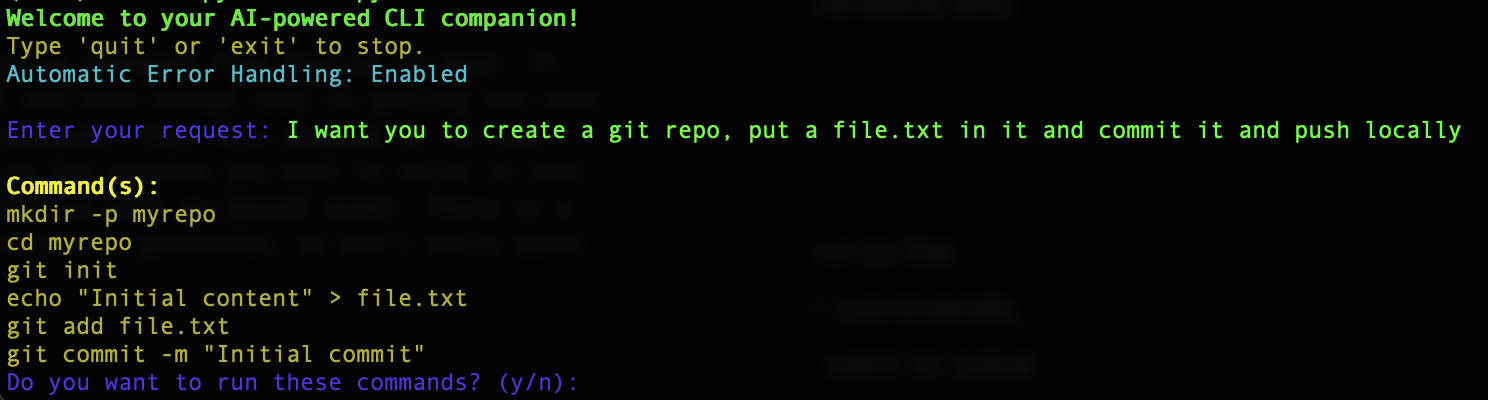
In hindsight exe.py is the kind of thing GitHub Copilot's terminal mode and Claude Code now do natively and better — they have actual context about your shell history and your project. But back when I wrote this, neither of those existed in a form I could use, and the bar was "translate English to a shell command without nuking my home directory," which a free Deepseek model gets right plenty often.
Source is on GitHub. It's two files, an install.sh, and a requirements.txt. If you want to use it the same way I do, set OPENAIAPIKEYENV in a .env next to gpt.py, set OPENROUTERAPIKEY for exe.py, and alias whichever one you actually want to call.
No time to write a full breakdown for everything — this description was written by an LLM.